
Your Cart
Loading

GainPilot Clip - Soft/Hard Clipper for Ableton Live | Max for Live

On Sale
$5.00
$5.00
Added to cart

Max for Live clipper for Ableton Live with soft and hard clipping, 4x oversampling, and RMS Match auto makeup based on real loudness measurement.
You will get the following files:
  • AMXD (99KB)
  • PDF (287KB)
  • PDF (608KB)

Customer Reviews

There are no reviews yet.

Live Product / GainPilot Clip Utility / $5

Soft/hard clipping with RMS Match.

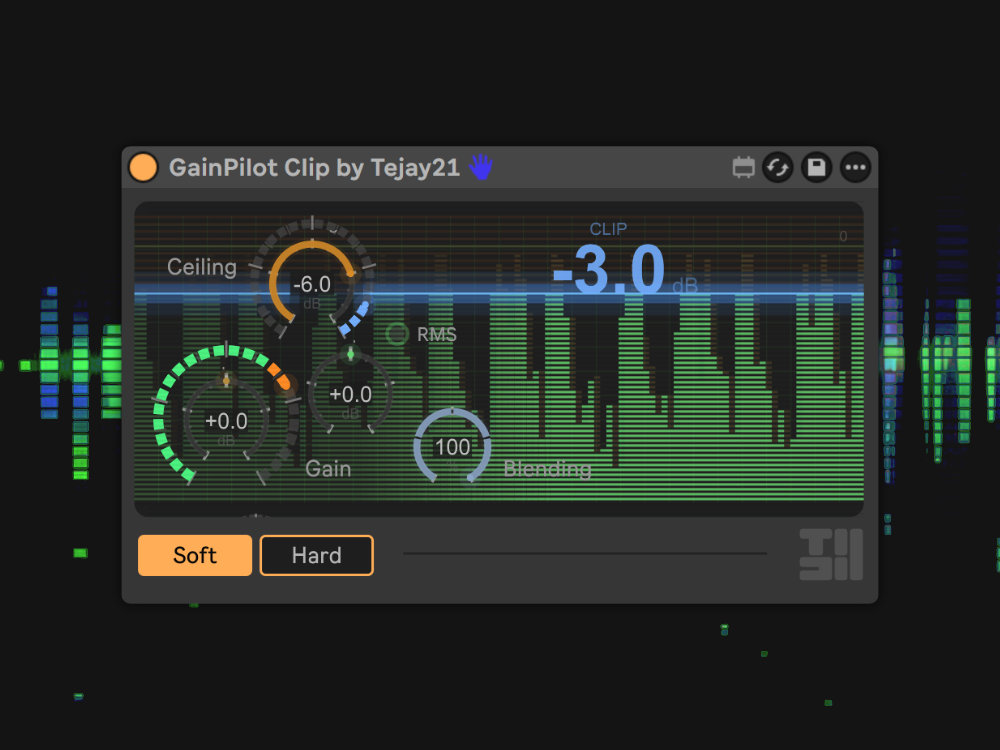
GainPilot Clip gives you soft and hard clipping with 4x oversampling, a dry/wet blend, and a CRT waveform display that shows exactly what is being clipped. RMS Match handles loudness compensation from real measurement.

01 / Action

See it in action

Soft vs hard clip, CRT waveform feedback, and one-click RMS Match makeup.

02 / Features

Features

Soft + Hard Clip Soft mode delivers warm, musical saturation with even harmonics. Hard mode is a precise digital clip - transparent until you push it.
4x Oversampling Built-in upsampling reduces aliasing for cleaner clipping. Always on - no configuration.
CRT Waveform Real-time pre/post waveform overlay on a retro CRT screen. See exactly how the clipper shapes your signal.
Blend Dry/wet mix for parallel clipping. Dial in subtle warmth at low blend, or go full clip at 100%. At 0%, true bypass.
Input + Output Gain Drive into the clipper with Input Gain, set your output level independently.
Clip Amount Peak-hold display shows exactly how many dB are being clipped. Click to reset.
RMS Match One-click makeup from measured loudness loss - not -ceiling guesswork. Click once, wait ~2 seconds, done.
DC Blocker Built-in high-pass removes DC offset after clipping. Always active.
03 / How

How it works

  • 1. Set your Ceiling - the level above which audio gets clipped
  • 2. Choose Soft or Hard - gentle saturation or a firmer edge
  • 3. Drive with Input Gain - push more signal into the clipper
  • 4. Click RMS Match - level-match based on measured loudness loss
  • 5. Dial in Blend - mix processed and dry signal to taste
04 / Why

Why GainPilot Clip

  • RMS Match - auto makeup based on real loudness measurement, not -ceiling guesswork
  • CRT visualization - real-time waveform overlay with this level of visual detail
  • M4L native - no external VST, perfect Ableton integration
05 / Ideal for

Ideal for

  • Drum bus - tame transients before the limiter
  • Master chain - catch peaks and reduce limiting artifacts
  • Individual tracks - soft clip character at low drive
  • Parallel clipping - Blend in only what you need
06 / Specs

At a glance

  • TypeMax for Live Audio Effect / $5
  • Latency0 samples (Ableton-reported)
  • Oversampling4x built-in
  • Soft clipWarm saturation (-1.33 dB transparency)
  • Hard clipZero coloration below threshold
  • RMS Match~2-second measurement window
  • RequiresAbleton Live 12.2+ with Max for Live
07 / Ecosystem

Part of GainPilot

  • Stage - sets track level more quickly
  • Clip - controls peaks after that
  • Ableton Live 12.2 or later with Max for Live (Suite, or Standard + Max for Live)
See GainPilot Stage